Showing posts with label Plugins. Show all posts

Tuesday, 30 April 2024

Attach and Un-Attach a Hat in Maya

Attach & Un-attach a Hat in Maya Using the Parent Master
In this short (just under ten minutes) tutorial for animation beginners we show how to attach and un-attach a hat in Maya using the free ZV Parent Master Plugin

The ZV Parent Master Plugin is a very useful tool that we recommend for attaching and un-attaching objects in Maya.  To see how to download and install the Parent Master, read this blog post and watch this video.  

Tuesday, 19 March 2024

Lock To World Tool Stops Feet Sliding

We're recommending this new animation script "Lock to World", available for download at Gumroad.  The Lock to World tool does the same job as the Anchor Transform Tool - which no longer works in newer versions of Maya since the upgrade to Python 3. 

Sliding feet can be a problem when animating a character walk or a walk cycle.  Fortunately for Maya animators, the Lock to World tool created by Jesse Ong Pho offers a simple solution. 

Rather than manually tweaking your animation to stop the feet sliding, this script lets you anchor a transform for any given time range in your animation.

Friday, 23 February 2024

How to Install and Use the Parent Master Plugin


In this short video we show how to install and use the free Parent Master Plugin for Autodesk Maya. The Parent Master plugin is a useful tool that allows animators to attach and un-attach objects easily and quickly.  Here at Animation Apprentice we've been using it and recommending it since 2014.  The plugin is a Python script created by Paolo Dominici and has recently been updated for py3.  Watch the video above to see how to install it. You can also read our original blog post here from 2014.  You can find the PM official site here, and also find the latest version at Paolo Dominici's site here.

Thursday, 26 September 2019

How to Install the ParentMaster Plugin


Installing plugins in Maya can be a fiddly process, and often needs troubleshooting. And, worse, every time Maya updates their software, you have to re-install all the plugins you installed a year ago. Above is a handy short video showing how to install the free ParentMaster plugin by Paolo Dominici to the latest version of Maya - Maya 2019. The Parentmaster plugin is very useful for attaching and un-attaching objects. Say you have a character who picks up a phone, and then puts it down again. For this, you need the ParentMaster. To see more about how to install the Parentmaster plugin, see this blog post.

Friday, 18 May 2018

Free Anchor Transform Plugin Stops Feet Sliding

Anchor Transform by Robert Joosten stops feet sliding
Sliding feet can be a problem when animating a character walk or a walk cycle. Fortunately for Maya animators, Robert Joosten’s new Anchor Transform Maya plugin offers animators an easy solution.

Rather than manually tweaking your animation to stop the feet sliding, rigger Robert Joosten has come up with a script that lets you anchor a transform for any given time range in your animation.

Tuesday, 12 December 2017

bhPathAnim by Brian Horgan

bh_pathAnim Launch Video from Brian Horgan on Vimeo.

The very talented Brian Horgan has just released a new path system for animal and creature locomotion. At $30, bhPathAnim isn't free, but it is priced attractively and could be on any animator's Christmas wish-list. Brian Hogan describes bh_pathAnim as "a robust and flexible new tool for path animation in Maya". His goal was to make it "simple and intuitive", easy to "attach any rig, with any number of limbs and body controls, to a path and animate it walking or running along it". bh_pathAnim "will work for bipeds, quadrupeds, and insects". We haven't had a chance to road-test it yet, but it does look very handy. You can download the new tool from gumroad.com.

Wednesday, 30 August 2017

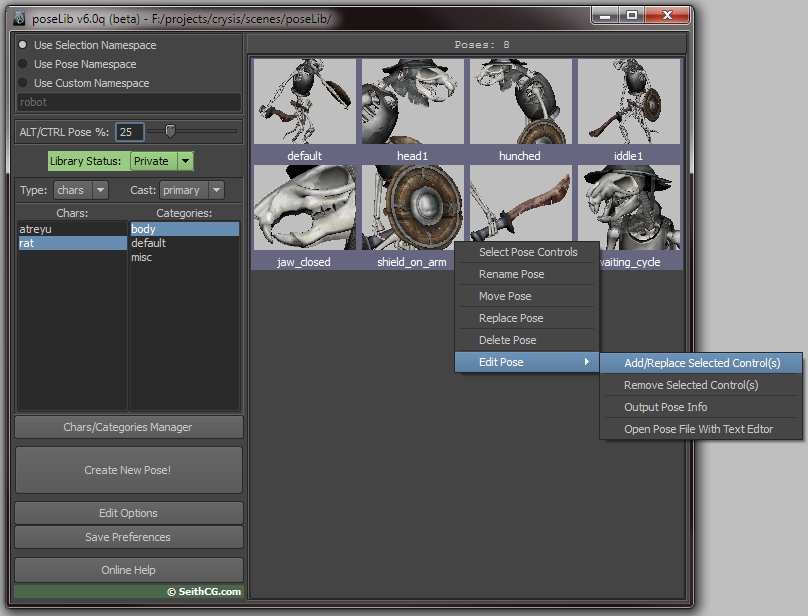
Pose Lib for Maya - Save Your Poses!

Pose Lib - free at http://www.studiolibrary.com
Pose Lib is a great free tool for managing poses and animation in Maya.  It's a super-useful free script for animators; you can use it to record a pose for any object in Maya, meaning that you can build a library of poses for your characters.

To use Pose Lib, download the tool, select your character, hit the "new pose" button, and a pose file is created in the relevant directory, along with the corresponding icon (a .bmp file).

Friday, 10 June 2016

A Great Free Script To Toggle Control Curve Visibility On and Off

Morpheus
Here is a very useful script for Maya animators, developed by Justin Barratt, and one which we are recommending for all our students here at Animation Apprentice. It's a super-useful tool, used to toggle the visibility of your animation rigs' control curves on and off.

All you have to do is paste the lines of script below in your script editor in Maya (under the MEL tab) and then save save it to a shelf in the usual way. Once you've done this, it should help to speed up your workflow and make you a faster, and better, animator.

Tuesday, 10 May 2016

Studio Library - Tool To Manage Poses in Maya

Autodesk Maya has its weaknesses, and one of these is the difficulty of copying and pasting your animation from one character rig to another.

Maya also lacks a user friendly interface for saving out and re-using your character poses.

Fortunately, the free Studio Library tool now offers Maya animators a Python script for managing poses and transferring animation in Maya.

Thursday, 4 June 2015

The Top Three Free Maya Plugins Every Animator Should Use

Maya 2016
What free plugins do Maya animators need? Each time Autodesk release a new version of Maya they fix many things that don't appear to need fixing - such as the design of the overall interface, but leave many traditional weaknesses in place.  Luckily for us, there are a number free plugins that can easily be accessed by Maya animators to make our lives easier. Here is our shortlist.

Saturday, 24 January 2015

The Free PAIE Plugin for Maya - How It Works

Autodesk Maya is a powerful piece of software, free for students to download, and now the industry standard for 3D animation around the world.

But Maya does have its weaknesses, and one of them is the difficulty of copying and pasting your animation from one rig to another. Got some great animation you want to copy on to a new rig? Computer says no.

But now the free PAIE plugin by Jacob Weiner has made it all much, much easier.  Here is how it works.

Wednesday, 17 December 2014

Why Has Mental Ray in Maya Disappeared?

Mental Ray - free with Maya
Mental Ray is a renderer that comes free with Maya - but sometimes it goes missing. One of the most common questions new Maya users ask is "Where has Mental Ray gone?!?"

Every Maya user faces this problem at least once, and the solution is not always obvious. You look in the Render Settings menu and - Mental Ray has vanished!

So, what to do to bring it back? And why does Mental Ray disappear so often?

Sunday, 27 July 2014

The ParentMaster - a Great Free Plugin for Maya

Parent Master
Autodesk Maya is free to students, and now has a huge user base around the world. Many Maya users have sought to improve the software, developing free plugins that can be plugged in to your free copy of Maya, adding to its usability.

The ParentMaster is a plugin created by Paolo Dominici which greatly simplifies the business of attaching and un-attaching objects in Maya. Say you want to animate a character picking up a ball and then dropping it. This free tool will make your life much, much easier.

Sunday, 29 June 2014

How To Use The Tween Machine

Below is a simple guide to installing and using the TweenMachine plugin, one of the most useful free plugins available to Maya animators.

The free TweenMachine plugin, created by Justin Barrett, helps animators to create breakdown poses in Maya on stepped curves. It's a time saving tool that takes much of the labour out of breaking down your poses - once you are happy with the timing of the main blocking of your animation. It has recently been updated (2024) for py3 - you can find the updated version here