How To Fix Floaty Animation Curves in Maya. A common mistake made by beginners in Maya is "floaty curves". So how do you fix floaty curves? The answer is simple - with the Flat Tangents button in Autodesk Maya.

Showing posts with label Animation techniques. Show all posts
Showing posts with label Animation techniques. Show all posts
Thursday, 8 January 2026

Wednesday, 5 November 2025
Why Animators "Progress The Action"
 |
| Brer Fox: "I specs I'm gonna skin ya" |
"Progressing the Action" is a concept developed in the Animator's Survival Kit, in which Williams describes it as the "secret of lipsync". But what does progressing the action really mean?
Wednesday, 6 November 2024
Why Animators Should Cut on Movement

Let's say you are cutting from a wide shot to a close up, you start the motion in the wide shot, then carry it over to the next shot. This makes the cut feel less abrupt.
Friday, 11 October 2024
Attaches in Maya - The "Cheat Method"
In this short video above we demonstrate how to do Attaches and Parenting in Maya, using "The Cheat Method". It's a very simple approach which involves parenting an object to another - in this case, Monty's hat, using the simple Shift Select P method. Then, rather than un-attach the hat, we simply replace the hat with a new identical hat, which looks exactly the same. This way, we don't have the bother of un-attaching the original hat - we can just remove it from the scene and replace it with a new one.
Friday, 23 February 2024
How to Install and Use the Parent Master Plugin
In this short video we show how to install and use the free Parent Master Plugin for Autodesk Maya. The Parent Master plugin is a useful tool that allows animators to attach and un-attach objects easily and quickly. Here at Animation Apprentice we've been using it and recommending it since 2014. The plugin is a Python script created by Paolo Dominici and has recently been updated for py3. Watch the video above to see how to install it. You can also read our original blog post here from 2014. You can find the PM official site here, and also find the latest version at Paolo Dominici's site here.
Friday, 16 February 2024
How to Import an Image Plane into Maya
Monday, 27 November 2023
Animating With Maya's Motion Trail Tool
This short video (just three minutes long) shows how to use Maya's Motion Trail Tool. The Motion Trail Tool is very useful for smoothing out the kinks and bumps in your animation, to ensure that your arcs and paths of animation are as smooth and flowing as possible. Bumpy animation curves will create pops and bumps in your animation. The Motion Trail Tool is one way of overcoming these problems and giving your animation an extra polish.
Thursday, 9 November 2023
How to Use The Layer Editor in Maya
How to use the Layer Editor in Maya. This short video tutorial is part of our series of beginners' tutorials on how to use Autodesk Maya, and how to develop a fast, efficient workflow. The Layer Editor works much like layers in Photoshop - it allows you to put different elements of the shot on different layers, so you can work faster and more efficiently.
Thursday, 29 June 2023
How To Import Live Action Reference Into Maya
The video above explains how to import live action reference into Maya. There are two basic methods; importing a series of individual frames, and importing a movie file. Both can be fiddly - watch the video to see how it is done. To see more detail on how to use live action reference to create animation in Maya, read this blog post.
Tuesday, 28 June 2022
How to Animate Lipsync - with No Lips
 |
| "Monty" dialogue by Rich Jeffrey |
The answer, of course, is that it's all in the acting and the performance. If the body language is working, then the audience will believe that the character is speaking - even if the character itself has no mouth.
Tuesday, 12 April 2022
Hold Ms Bs and Ps for Two Frames
 |
| Hold Ms Bs and Ps for 2 frames minimum |
The reason for this is that we need to compress our lips together to make these shapes, after which there is a little expulsion of air.
For Ms Bs and Ps to read clearly, they need to be making the shape on the screen for at least two frames, even if the dialogue is rapid.
Friday, 1 April 2022
Why Lipsync Should Be "Two Frames Ahead"
 |
| Cliff Nordberg |
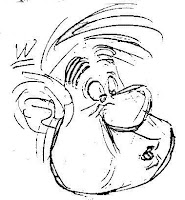
For your audience to be able to read the lip sync clearly you'll want to offset the jaw opening at least two frames before the audio is actually heard.
If you have the jaw opening and closing exactly on the frame that the audio is heard, your lip sync will feel slightly "off sync", ie a little late.
Wednesday, 9 February 2022
Why Lipsync Needs Wide and Narrow Shapes
 |
| Mouth shapes by Cliff Nordberg |
When animating dialogue and Lipsync, it's important to remember that animators need a contrast between the wide and narrow mouth shapes, otherwise the Lipsync tends to feel a bit like a dustbin lid opening and shutting.
The key is to find flexibility, especially between the wide shapes, such as "ee" shapes, and narrow shapes, such as "oo" or "w" shapes.
Sunday, 6 February 2022
Lipsync: Open Wide on the Big Vowels
 |
| Wide on the big vowels |
The trick with animating good dialogue is to avoid the timing of the mouth shapes feeling soft and mushy.
By opening wide on the big vowels, animators can get more texture into a dialogue shot, more "light and shade", so that the animation "hits the accents", and makes a more positive statement.
The timing of the open and shut of the jaw should be nice and snappy, with only a single frame ease-in to the wide mouth position.
Tuesday, 1 February 2022
How to Fix a Floaty Animated Weight Lift
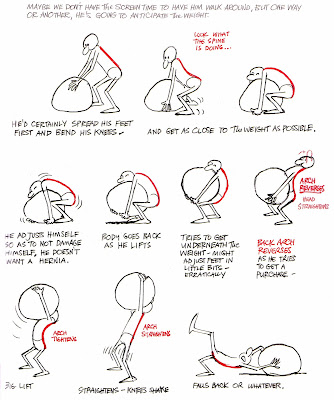 |
| Weight lift from the Animator's Survival Kit |
One of the more tricky exercises our students have to tackle is to animate a character lifting a heavy object, such as a box. The box is just a bunch of pixels - it has no weight. So the challenge is to make it appear heavy.
To get started, take a look at the thumbnail sketches on the left, taken from the book we recommend all our students buy - The Animator's Survival Kit.
The thumbnails show how important it is for the character to get their feet right underneath the object they are going to lift. That way, the weight of the object falls directly over the character's heels - and the object feels heavy.
Tuesday, 19 October 2021
Why Animators Need to Be Art Directors
 |
One of the most common mistakes made by student animators is to combine a realistic character (say, a dinosaur or dragon) with a cartoony environment. The character and the set come from different worlds, and they don't always work well together.
Friday, 7 May 2021
How to Animate a UFO with Blend Shapes
We've uploaded a new four-part tutorial to our expanding list of free tutorials at our YouTube Channel. This latest tutorial demonstrates how to animate Blend Shapes (also known as Morph Targets) in Maya. The idea is to take a simple object (a cube) and turn it into a shape-shifting UFO - as in the example above. Blend Shapes, which are used extensively in facial rigging, are a simple animation technique that can yield impressive results.
Sunday, 28 March 2021
Speed Lipsync - How to Animate Dialogue Fast
In this short video (less than five minutes long) I set out the basic principles for animating dialogue and lipsync swiftly and cleanly. The trick is to avoid over-complicating the process. Start by animating the jaw open and closed - open on the vowels, closed on the consonants (make sure you close the mouth for at least two frames on Ms Bs and Ps, or they won't "read"). Then, layer in the wide and narrow mouth shapes (narrow for "oo" and "w" shapes, wide for "a" and "ee" shapes). Tidy it all up, and you're done.
Monday, 21 September 2020
Always Add a Blink on a Head Turn
 |
| When do we blink? |
In the video below, I explain why it is that characters need to blink much more often than you might think. Our eyelids act much like the shutter of a camera, cutting on motion and editing out everything but the important information that we actually need to see.
And, importantly, when you animate a blink, don't forget to add a little motion to the eyebrows as well.
Saturday, 29 August 2020
Why Animators Need To "Hit The Accent"
 |
| Hitting an accent - Animator's Survival Kit |
By "accents", we're not talking here about a regional accent - say a Scottish or Welsh accent - we're talking about making it clear in the poses that the character is speaking the line of dialogue.
In this case an "accent" is the part of the line of dialogue that has emphasis, and need to be punctuated. Take a look at the example from the Animator's Survival Kit above and left.
Subscribe to:
Posts (Atom)